 WeatherRoam
Weather on the Way vs Drive Weather vs WeatherRoam
These road-trip weather apps answer two different questions. Weather on the Way and Drive Weather forecast the weather along a route you have already chosen. WeatherRoam helps you choose where to go, and then plans the trip day by day.
Start with the question you have
"Where should we go, and on which day?" Use WeatherRoam. It compares the places you are considering and ranks the towns within your drive by the weekend forecast.
"What will the weather be along this drive?" Use a route-weather app: Weather on the Way on iPhone, or Drive Weather or Highway Weather on iPhone and Android.
WeatherRoam: choose the destination
A route-weather app starts after the decision is made: you enter a destination and it shows the weather on the way there. WeatherRoam starts earlier, when you are still deciding between the lake, the mountains and the coast.
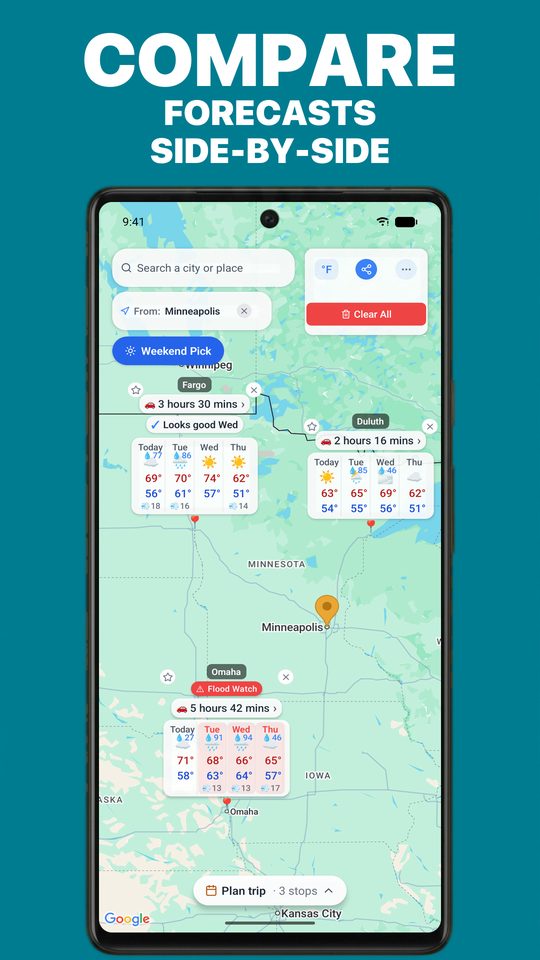
- Compare up to 20 places on one map. Each pin shows its forecast, your drive time and any severe-weather alert, so the choice is visible at a glance.
- Weekend Pick. Say how far you will drive, from 1 to 6 hours, and it ranks the towns within reach by the weekend forecast, with a drive time and a plain verdict for each.
- "Looks good" on every day. Each forecast day carries a verdict, so you can spot the good days without reading every number.
- A day-by-day trip plan. Put your stops in order and give each a day of the trip. Every stop then shows the forecast for the day you will be there.
- Free on iPhone and Android. No ads, no account and nothing to buy.
What it does not do: WeatherRoam's forecast runs four days, it has no radar, and it does not time a forecast to your position along the road.
Weather on the Way and Drive Weather: check the drive
These apps do the same job as each other, and it is a different job from WeatherRoam's. You give them a route and a departure time, and they show the forecast for each stretch of road at the time you will be driving it.
Weather on the Way
For iPhone, iPad and CarPlay. It shows the weather at each point of a route for the time you will pass it, with radar and departure times up to seven days out. It is free to start, with Pro by subscription or as a one-time purchase ($84.99 on its App Store listing). It has no Android version.
Drive Weather
For iPhone and Android. It shows the weather along a route by arrival time, with radar. The free version carries ads and plans two days ahead. Pro removes the ads and extends the route forecast to seven days, with in-app purchases from $5.99 to $34.99 on its App Store listing.
Highway Weather
For iPhone and Android. It shows forecasts for a trip at the time you will arrive at each point. Planning is free, and its hands-free driving mode is $14.99 a year.
Side by side
| WeatherRoam | Weather on the Way | Drive Weather | Highway Weather | |
|---|---|---|---|---|
| The question it answers | Where should we go, and on which day? | What is the weather along this route? | What is the weather along this route? | What is the weather along this route? |
| iPhone | Yes | Yes | Yes | Yes |
| Android | Yes | No | Yes | Yes |
| Price | Free. Nothing to buy. | Free to start. Pro by subscription, or $84.99 once. | Free to start. Pro from $5.99 to $34.99. | Planning is free. Driving mode is $14.99 a year. |
| Ads | None | None | In the free version | On Android, per its Google Play listing |
| What you compare | Up to 20 destinations side by side on one map | Alternative routes for one trip (Pro) | Routes for one trip (Pro) | Departure times for one trip |
| Ranks nearby towns by the weekend forecast | Yes, with Weekend Pick | Not in its listing | Not in its listing | Not in its listing |
| Trip planner with a forecast for the day you reach each stop | Yes | Stops along one route | Stops along one route (Pro) | Rest stops along one route |
| Forecast timed to each point along the road | No | Yes | Yes | Yes |
| Radar | No | Yes | Yes | Yes |
| How far ahead | 4 days | Departures up to 7 days out | 2 days free, 7 days with Pro | Not stated |
"Not in its listing" means the app's store description does not mention the feature.
Use them together
The two kinds of app fit one after the other. Pick the place and the day in WeatherRoam, where you can see every option at once. Then, if the drive itself crosses weather you care about, check that route in a route-weather app before you leave.